Seseorangmemesan VOID-USB
VOID-USB
ID
ORDER →
AI AGENT · INSIDE A FLASH DRIVE

Your AI agent. //In a flash drive.

VOID-USB turns a flash drive into a personal AI agent. Plug it into your PC, give it a command — by text, voice, or on a schedule — and it gets it done on its own — opening apps, typing, navigating. Nothing installed, and no trace left behind on the device.

plug & play scheduled tasks private & traceless
› ALREADY HAVE A DEVICE? OPEN APP →
› PLUG & PLAY · NO TRACE · WINDOWS 10/11
// SEE IT WORK

Watch VOID-USB in action.

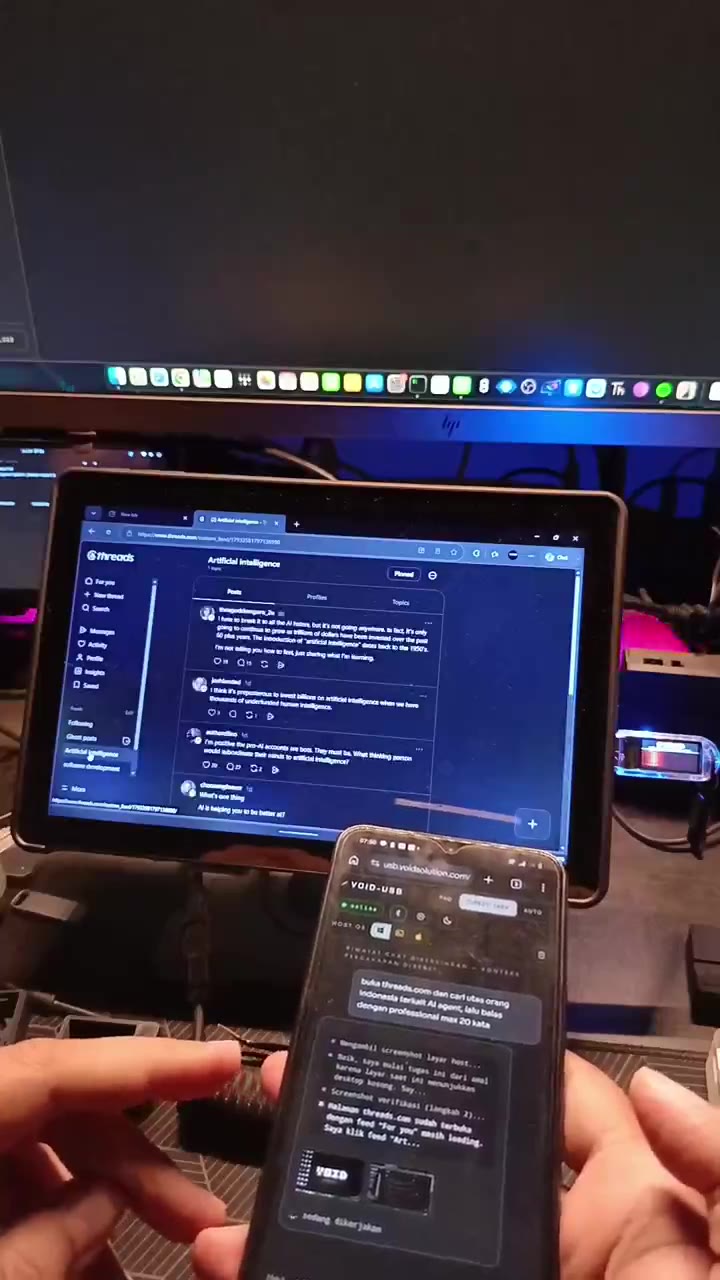
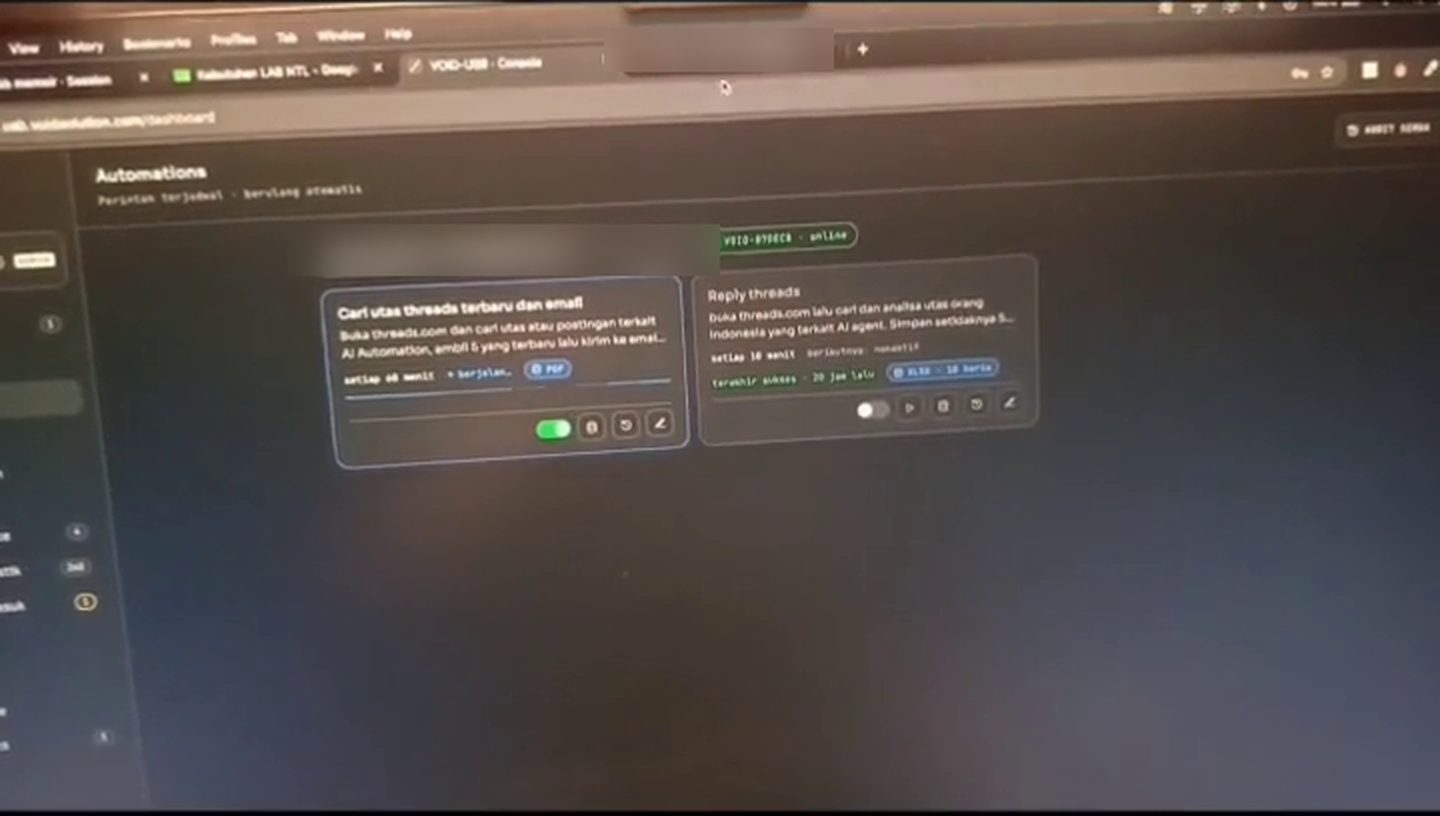
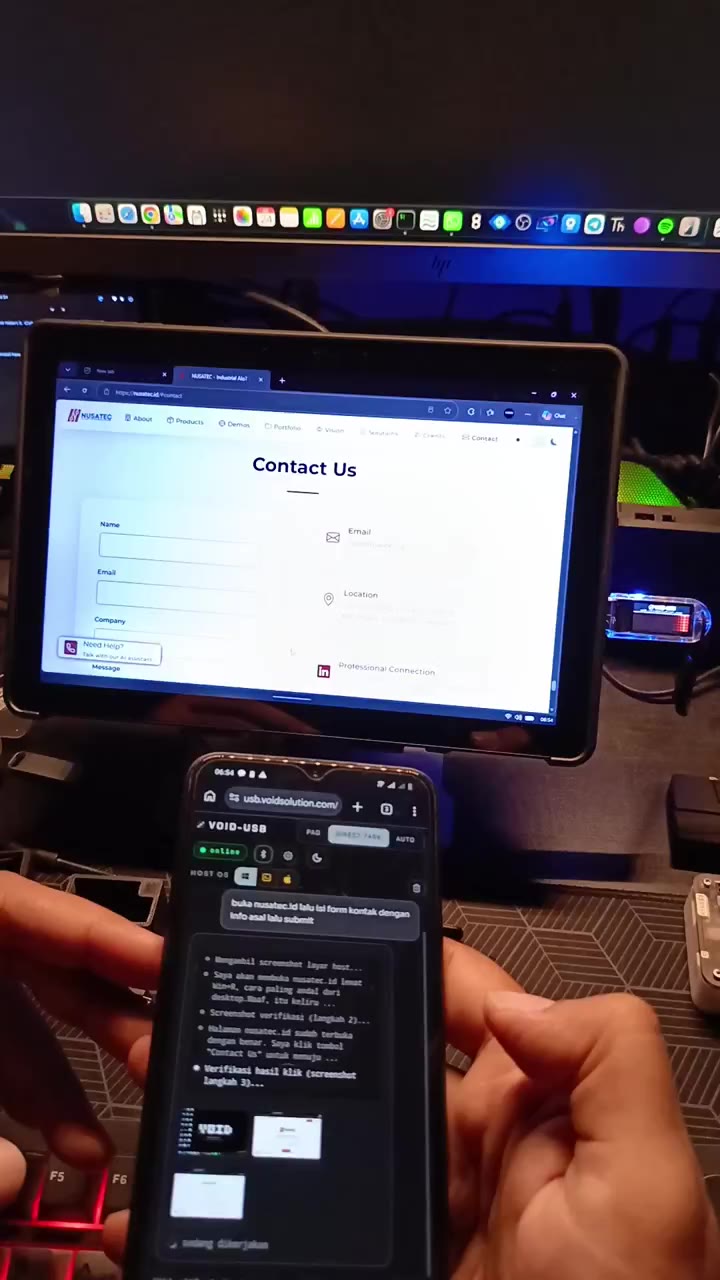
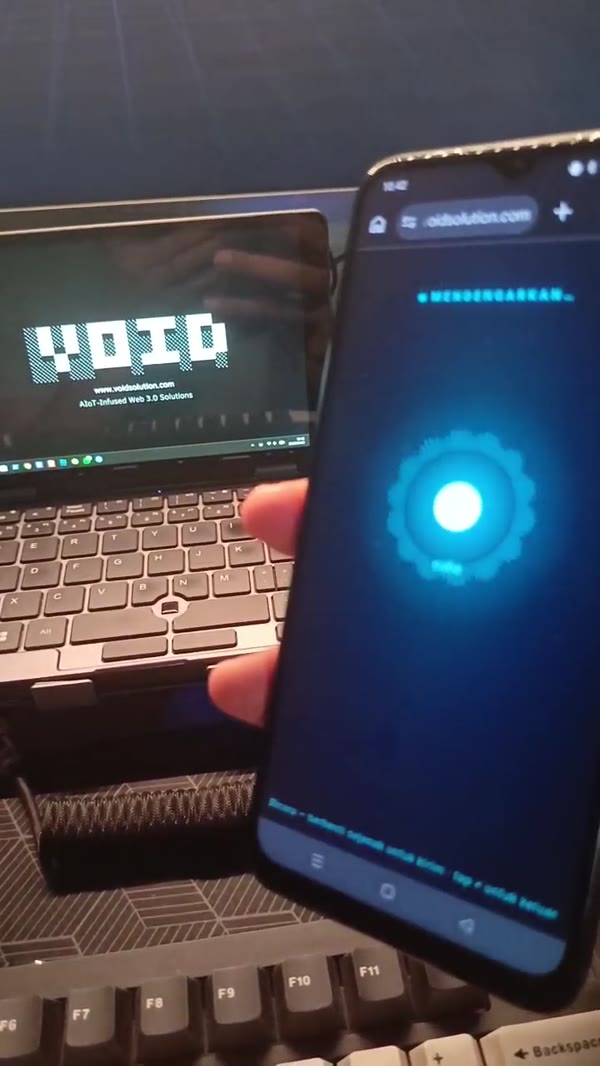
Six real demos, end to end — analyzing a Threads feed and auto-replying, a scheduled task that emails you the newest Threads posts, website form automation, form + captcha, voice from the app, and a live hardware run. Tap any clip to watch it stream.

1:34
AI AGENT · THREADS

Analyzes Threads & auto-replies

VOID-USB reads a Threads feed, analyzes the posts, then drafts and posts replies on its own — social media on autopilot, run from your phone.

2:31
SCHEDULED · THREADS → EMAIL

A task that runs itself, on a schedule

Written once in the cloud dashboard: find the newest Threads posts on a topic, take five, email them. It then repeats on its own — no SMTP setup, no MCP, no plugins, nothing installed.

1:48
AUTOMATION · WEBSITE FORM

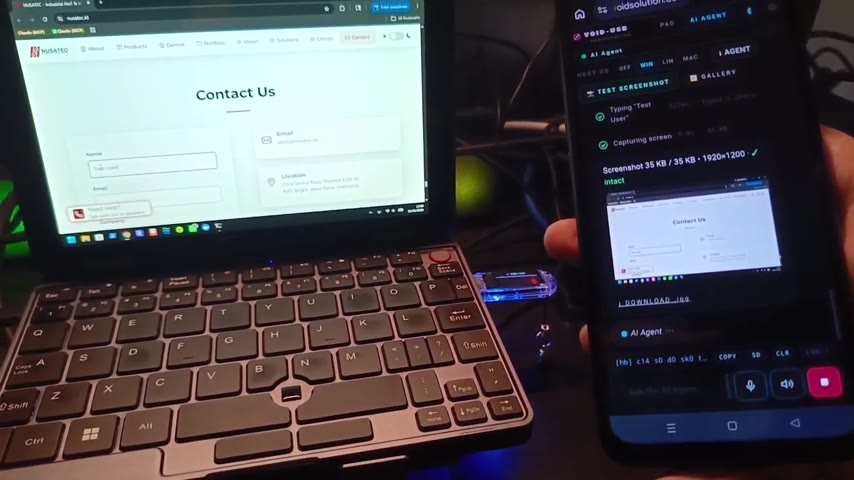
Opens a site & fills the form

From the phone, VOID-USB opens a real website and completes its contact form end to end — every field typed, then sent.

2:26
VOICE · WEB APP

Voice control from your phone

Hold the mic button in the VOID-USB web app on your phone, say the task, and watch it act on the computer.

1:48
AUTOMATION · FORM + CAPTCHA

Auto-fills forms & captcha

Watch it complete a web form end to end — typing every field and ticking the captcha itself.

3:03
VOICE · PRICE RESEARCH → SPREADSHEET

Compares prices, fills the spreadsheet

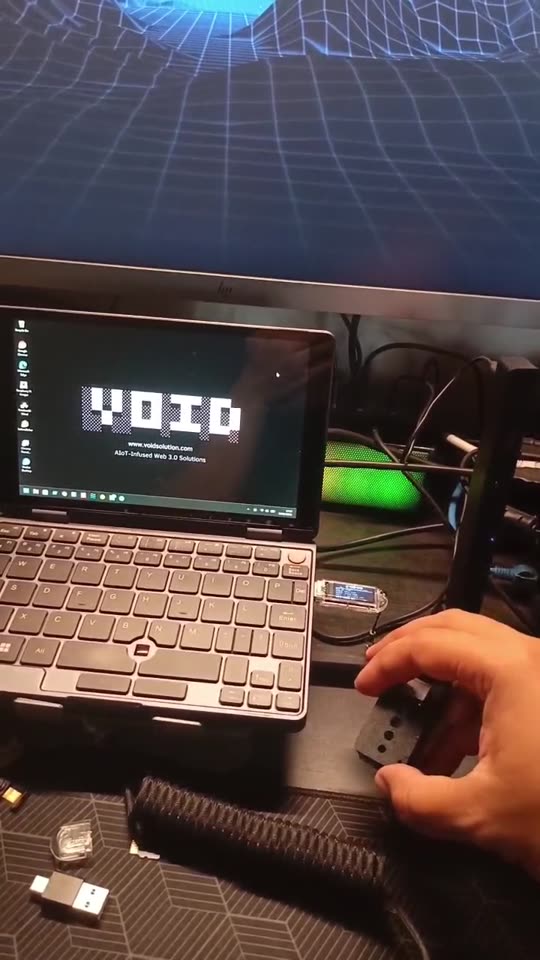
Unedited, on the real device on a real desk: say the task once and VOID-USB searches Tokopedia and Shopee, then fills a Google Sheet with product, price, shop and rating — a comparison table it builds by itself. Spoken here through the experimental add-on mic, a prototype that is not part of the shipped device; the shipped way to use voice is the phone web app above.

// HOW IT WORKS

Give a command. Wait a moment. Done.

VOID-USB works like an agent sitting right beside you. Tell it what you need from your phone, and it gets it done straight on the computer in front of you — with every step there for you to watch.

[ 01 ] UNDERSTAND

Reads your screen

Understands what's on screen and the context around it — like a teammate looking at the same display as you.

[ 02 ] DECIDE

Plans the steps

Works out the best way to handle your request, and explains every action it takes, transparently.

[ 03 ] ACT

Gets it done

Carries out each step itself — opening apps, typing, navigating — until your request is fully complete.

// AUTOPILOT

Set it once. It runs on schedule.

Save a task once and let VOID-USB run it on its own — every morning, every hour, or on the days you choose. Trigger it remotely from your phone anytime, and it works unattended on the computer even while you're away.

"every weekday, 8am — summarize my inbox and post it to our Threads." ↳ scheduled · runs unattended · trigger remotely · result sent to you
// WHAT YOU GET

One flash drive. An agent ready to work.

Built for one purpose: to lighten your work at the computer — no complexity, no learning curve, and with your privacy intact.

01

Always ready

Nothing to install on the PC. One quick setup from your phone and the agent is live.

02

Understands context

Recognizes what you're working on and helps for the situation — not just blindly running commands.

03

Actually acts

More than suggestions — it executes every step itself until your task is done.

04

Full control, in your hands

Command it by voice or text from your phone, and watch every step live. It only acts on your orders.

05

Works anywhere

Office desktop, a borrowed laptop, or a public PC — as long as there's a USB port, your agent rides along in your pocket.

06

Safe & traceless

Installs no software and stores no data on the computer you use. Unplug it, and nothing is left behind.

// SECURE BY DESIGN

An ordinary AI agent vs the one in your pocket.

Most AI agents demand installs, system permissions, and an account on every computer — along with the security risks. VOID-USB removes all of that: nothing installed, no data left behind. It runs on our managed cloud AI out of the box — the screenshots and commands needed to run your task are processed on our servers — or switch to your own key (BYOK) to send it straight to Anthropic on your own account. And because you drive it from your phone — watching every step and able to stop it instantly — you stay in control of everything it does.

ORDINARY AI AGENT
  • Must install software on every computer
  • Asks for broad system permissions
  • Needs an account & login before use
  • Can't run where installs are blocked
  • Tied to the one device it's installed on
  • Stores data & leaves traces after use
VOID-USB
  • Just plug & use — nothing installed
  • No system permissions required
  • Nothing installed on the host PC
  • Optional BYOK — use your own AI key
  • You watch every step & can stop it anytime
  • Unplug it, and nothing is left behind
+

Cloud AI, or bring your own key

Out of the box the agent uses our managed cloud AI, so the screenshots and commands needed to run your task are processed on our servers — never sold or used for ads. Prefer full control? Switch to Bring Your Own Key (BYOK) and your data goes straight to Anthropic on your own account.

+

You stay in control

You drive VOID-USB from your phone and see every step it takes on screen, live — and can stop it the moment something looks off. It installs nothing, needs no admin rights, and can't persist on the host, so its reach never extends past the task in front of you.

// GET STARTED

Four steps, your agent is ready.

Almost as easy as an ordinary flash drive — just one quick WiFi setup for the dongle, no account.

01
PLUG IN

Plug in the drive

Insert VOID-USB into any computer's USB port. Recognized instantly — no pop-ups, no install.

02
CONNECT

Connect your phone

Open the app on your phone and tap Connect over Bluetooth. Linked in seconds.

03
SET WIFI

Configure the dongle's WiFi

After the Bluetooth link, you must pick a WiFi network that has internet for the dongle. This is the dongle's data & AI link — without it the AI and cloud features won't run. The app walks you through it on first use.

04
COMMAND

Speak or type

Give a command, e.g. "tidy up this folder and write a summary". It's that simple.

05
WATCH

Let it work

The agent completes the task right on the computer while you watch every step from your phone.

Phone app compatibility: use Chrome/Edge (Android or desktop). On iPhone/iPad, all browsers — including Chrome & Safari — lack Web Bluetooth; use the free Bluefy browser from the App Store to connect.

// THE PROMISE

Simple on every side.

0
INSTALLS
Nothing installed on the computer
0
DATA TRACE
Unplug it, nothing remains
<1m
TO READY
From plug-in to working
COMPUTERS
Pocket-sized, use it anywhere
// COMPATIBILITY

Built for every desktop.

A self-contained agent that runs on any computer — no install, no driver. Windows 10 and 11 ship first; macOS and Linux are on the way. Windows 7 and 8 are not supported — the host helper needs PowerShell 3.0 or newer, which those versions do not include.

Windows
Windows 10 & 11 · Windows 7/8 not supported
AVAILABLE NOW
macOS
Intel & Apple Silicon
COMING SOON
Linux
Ubuntu, Fedora & more
COMING SOON
// COMPARISON

Why VOID-USB is easier.

Every tool below can automate a computer. The difference is what you have to do before it starts working for you.

VOID-USB OpenClaw Hermes Agent n8n
What you install on the PCNothing. Just plug it in.You host it yourselfA desktop appCloud or your own server
Ready to use inA few minutesA few hoursAbout an hourWeeks to get good
Do you need to learn it firstNoYesYesYes — it has its own course
How you set up a taskSay what you wantWrite skills and configCommands and saved skillsWire the steps by hand
Need your own AI keyNoYesYesYes, one per service
How you stop itUnplug itUninstall and clean upUninstallTurn the workflow off

VOID-USB

What you install on the PCNothing. Just plug it in.
Ready to use inA few minutes
Do you need to learn it firstNo
How you set up a taskSay what you want
Need your own AI keyNo
How you stop itUnplug it

OpenClaw

What you install on the PCYou host it yourself
Ready to use inA few hours
Do you need to learn it firstYes
How you set up a taskWrite skills and config
Need your own AI keyYes
How you stop itUninstall and clean up

Hermes Agent

What you install on the PCA desktop app
Ready to use inAbout an hour
Do you need to learn it firstYes
How you set up a taskCommands and saved skills
Need your own AI keyYes
How you stop itUninstall

n8n

What you install on the PCCloud or your own server
Ready to use inWeeks to get good
Do you need to learn it firstYes — it has its own course
How you set up a taskWire the steps by hand
Need your own AI keyYes, one per service
How you stop itTurn the workflow off
When is another tool the better pick? If you are a developer and want full access to your files and terminal, OpenClaw and Hermes go deeper — and they are free. If you need to move thousands of records between apps every day, n8n is built for that. VOID-USB is for people who want their computer to do the work without becoming a technician first.
// FROM BUYERS

What the first buyers actually said.

Unedited WhatsApp messages from people who bought a unit from the first batch — including the parts where they asked us for more.

Sudah saya coba dan work perfectly dan kebih dari 60 langkah … agent nya bisa improve cara problem solving. Perfect banget mas, dari awal pake sampe sekarang jeda makin berkurang juga antar stepnya.

“Tried it — works perfectly past 60 steps. The agent improves its own problem-solving, and the pause between steps keeps getting shorter.” — after a long automation run; a few errors on long, complicated tasks are called fair.

VOID-USB buyer · August 2026
Mantap bisa mas, so far bagus sih — ada analisa ketika actionnya salah, dia bisa mengoreksi sendiri.

“Works great — when an action goes wrong it analyses it and corrects itself.”

VOID-USB buyer · July 2026
Keren asli. … Keknya lebih mantap 😄

“Genuinely cool. … This feels even better 😄” — their first reaction on plugging the unit in, then after a change they had asked for.

VOID-USB buyer · July 2026

Names and profile photos are cropped out of every screenshot. Quotes are shown word for word, in the language they were written in — nothing has been rewritten to sound better.

// PLANS & PRICING

Start free. Then your way.

One device, paid once — with 30 days of unlimited AI included free. After the trial it never switches off: the device drops to the free plan, or you go unlimited for one flat monthly fee, or bring your own AI key.

THE VOID-USB DEVICE SAVE Rp250.000
Rp2.000.000 Rp1.750.000
Official price Rp2.000.000 — Rp250.000 off today. Roughly Rp4.800/day across your first year, with everything included.

Pay once and the device is yours to keep — it's not a subscription. And the first 30 days of unlimited AI plus lifetime firmware updates come with it.

  • One-time payment — own the hardware outright, no mandatory subscription.
  • 30 days of unlimited AI included free — start using it the moment you plug in.
  • Free firmware updates for the life of the device — it keeps getting better.
  • Runs on autopilot — schedule tasks and trigger them remotely, at no extra cost.
  • Plug & play anywhere — nothing installed on the PC, works on any computer with a USB port.
30 days of unlimited AI — included freeStarts the day you first plug in. No card required — and when it ends the device drops to the free plan rather than stopping.
Free
Rp0/ forever

When the 30-day trial ends you are not cut off — the device drops to the free plan and keeps working, with a daily cap on AI commands.

  • 20 AI commands per day, reset every midnight (WIB)
  • Same models and features as the paid plan — only the volume is capped
  • Trackpad, keyboard, macros and screenshots stay unlimited
  • No card, no expiry — upgrade only when you need more
START FREE
MOST POPULAR
Unlimited
Rp150.000/ month

Unlimited commands on VOID's managed AI — always the latest models, nothing to set up.

  • Unlimited AI usage — no metering, no caps
  • Always-current top models, managed for you
  • Zero setup, no daily cap to think about
  • Cancel anytime
GET UNLIMITED
Bring your own key
Anthropic’s rate

Have an Anthropic account? Add your API key per device in the dashboard — that device is billed to you, the daily cap no longer applies, and you need no VOID subscription for it.

  • Use OpenAI, Anthropic, Google, or any compatible provider
  • Pay your provider directly — no markup
  • Your keys stay on your own device
  • No monthly VOID fee
USE MY OWN KEY
// ORDER NOW

Order yours today.

Get your VOID-USB now — sign in with your Google account, enter your shipping details, and pay the deposit to lock a unit from the first batch. Your privacy stays intact, control stays in your hands.

ORDER NOW
// FEATURES

Everything the AI agent can do.

VOID-USB isn't a chatbot that answers — it's an AI agent that acts. It reads the screen, decides the steps, and carries the task out on the computer in front of you. Below is the full picture, including the agentic-workflow dashboard that lets you build, run and watch multi-step automations.

READ SCREEN
MOVE
CLICK
HOLD
DRAG
TYPE
HOTKEY
CLIPBOARD
OUTPUT
VOICE
REMOTE
AUTOMATE
// THE AGENT LOOP

It doesn't just answer — it gets it done.

01
SEE

Reads the screen

It captures and understands what's on screen — the apps, windows and content — so it acts with real context, not guesses.

02
THINK

Plans the steps

Your AI model (your key) breaks the goal into concrete steps and decides what to click, type and open next.

03
ACT

Does the work

It drives the real keyboard & mouse over USB — opening apps, typing, navigating — and loops back to verify each result.

// CAPABILITIES

One flash drive. A full agent toolkit.

Agentic execution

Give a goal, not click-by-click steps. It plans and executes multi-step tasks on its own, end to end.

Voice & text control

Type the task, or hold the mic button in the phone web app and say it. No keyboard on the host needed — your phone is the remote.

Screen vision

It sees what you see — reading the live screen so its actions land on the right buttons and fields.

Plug & play

Nothing is installed on the computer — no driver, no admin rights. A one-time setup from your phone (Bluetooth, then pick the dongle's WiFi) and it's live.

Standard USB device

It appears as a standard USB keyboard/mouse, so it needs no drivers or permissions. Agent control currently supports Windows 10 and 11 — not Windows 7 or 8; macOS and Linux are on the way.

Private & traceless

Nothing is installed and nothing is left behind. Unplug it and the computer is exactly as it was.

// PLATFORM DASHBOARD

An agentic-workflow dashboard for your phone.

The dashboard is a remote control center for every computer running VOID-USB. Connect multiple drives at once, automate each host PC or laptop from afar, record and replay real input sequences, and schedule tasks to run on their own — all from one console.

  • Remote automation — operate any host PC or laptop entirely from the dashboard. The machine with the drive plugged in performs the actions while you direct it from anywhere.
  • Multi-device fleet — connect and manage many VOID-USB drives at once from one console; select a target machine and dispatch tasks to it on demand.
  • Record & replay — capture a real session of mouse movement, clicks and keyboard input once, then replay that exact sequence whenever you need it — on the same machine or across your fleet.
  • Scheduled tasks — set any workflow to run automatically on a schedule (for example, every weekday at 08:00) with no one at the keyboard.
  • Live monitoring — follow every step in real time from the dashboard, and stop a run instantly whenever you want.
  • Run history & audit — review, audit and re-run past executions per device, with a full record of what was done.
// VOICE CONTROL

Speak it from your phone.

Open the web app on your phone, hold the mic button and say the task — your phone's own speech recognition turns it into a command and the agent runs it on the computer. No wake word and no extra hardware: it works in the browser you already have. A hands-free on-board mic is still experimental and isn't part of the shipped device.

[hold mic] open maps and search Bandung
› released · transcribing…
maps opened · searching "Bandung"
MODEL = your own key (BYOK)
DATA → your chosen AI provider, direct
SCOPE = installs nothing · no admin rights
you watch every step → stop it anytime
// SECURITY & PRIVACY

Your model. Your data. Your call.

By default VOID-USB uses our managed cloud AI, so the screenshots and commands needed to run your task are processed on our servers. You can switch to your own API key (BYOK) to send it straight to Anthropic on your own account. You drive it from your phone, watch every step it takes, and can stop it the instant something looks off — and because it installs nothing and needs no admin rights, its reach stays limited to the task you gave it.

Ready to put an agent in your pocket?

Join early access and be first to run VOID-USB on your PC.

JOIN EARLY ACCESS